Showing posts with label SCOM 2007. Show all posts

11 May 2009

Management Pack Dell: Regional settings bug

[Update: Dell will only deliver a 4.0 with this bug corrected. No intermediate release. We signed an NDA to get a hand on the 4.0 beta, but i left the company before having it. The 4.0 should be released by the end of july.]

I have an open issue with the Dell Management Pack and our regional settings. I found out the bug, the resolution, but now Dell ask me to wait for the MP V4.0 because i am the only one to report this bug.

I guess that we are not the only one to have this bug, and it's about people not going through opening a case at Dell. I will expose the issue here, hoping others will realize they are affected too. My goal is to have Dell releasing a corrected version before 4.0 that will be out in months.

The Bug is for DellStorageDiscovery.vbs:

Source: Health Service Modules
Event number: 21405

The process started at 09:29:38 failed to create System.Discovery.Data, no errors detected in the output. The process exited with 0 Command executed: "C:\WINDOWS\system32\cscript.exe" /nologo "DellStorageDiscovery.vbs" {XXXXXX-XXXX-XXXX-XXXX-XXXXXXXX} {XXXXXXX-XXXX-XXXX-XXXX-XXXXXXXXXXX} agent.mydomain.com Working Directory: C:\Program Files\System Center Operations Manager 2007\Health Service State\Monitoring Host Temporary Files 1\1821\ One or more workflows were affected by this. Workflow name: Dell.Connections.DellStorage.Discovery Instance name: agent.mydomain.com Instance ID: {XXXXXX-XXXX-XXXX-XXXX-XXXXXXXX} Management group: FIRSTMG

------
The badly function is (in red the problem):
Function CheckVBScriptEngine()
Dim bIsCompatV, var
Const VBSCRIPT_MIN_VERSION = 5.6
var = ScriptEngineMajorVersion & “.” & ScriptEngineMinorVersion
If (CInt(var)) < biscompatv =" False" biscompatv =" True"> 0 Then
CheckVBScriptEngine = Err.Number
Else
CheckVBScriptEngine = bIsCompatV
End If
End Function

The corrected function is:
Function CheckVBScriptEngine()
Dim bIsCompatV, var, sep, WshShell
Set WshShell = WScript.CreateObject(”WScript.Shell”)
sep = WshShell.RegRead(”HKCU\Control Panel\International\sDecimal”)
Const VBSCRIPT_MIN_VERSION = 5.6
var = ScriptEngineMajorVersion & sep & ScriptEngineMinorVersion
If (CInt(var)) < biscompatv =" False" biscompatv =" True"> 0 Then
CheckVBScriptEngine = Err.Number
Else
CheckVBScriptEngine = bIsCompatV
End If
End Function

PS: I also have a similar bug with the Microsoft ISA 2006 Management Pack. Microsoft acknowleged the bug and is going to deliver a new release.

05 May 2009

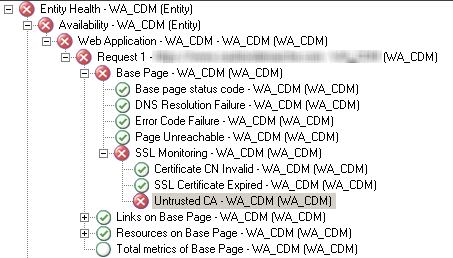
SCOM/OPSMGR: Web Application: Untrusted CA

Context:

  • You created a web application which use https (SSL)
  • The checkbox “monitor SSL health” is checked
  • When you log on the watcher node and call the same pages, you don't have any security alert through internet explorer
  • You do have the following error:

Cause:
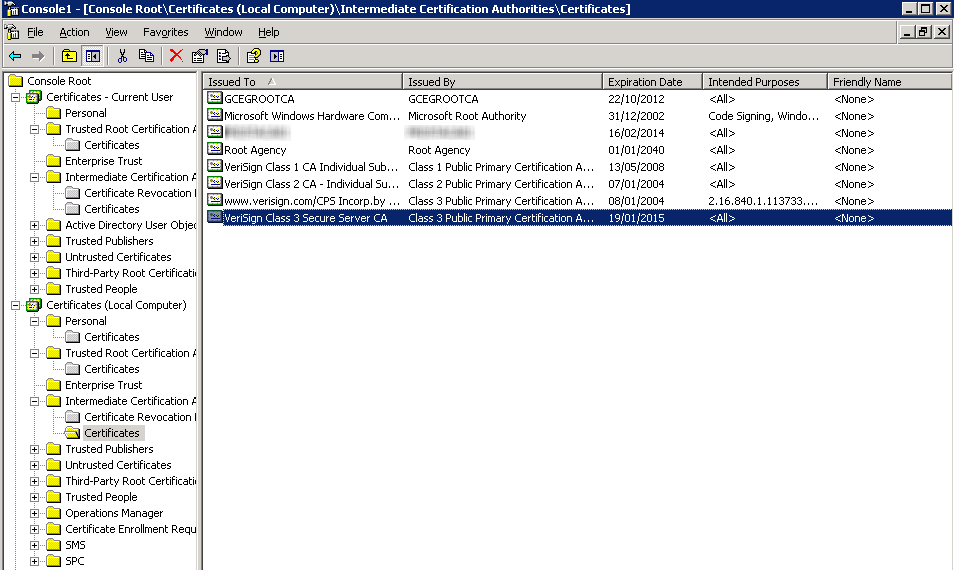
You are missing a certificate on the chaine. Your user account has the full chaine, but not the computer account. In my case, i had to add a Verisign (Class 3) certificate for the local computer account:
…And alerts are gone! We could just uncheck the health monitoring of certificate, but it's always better to get notified when it's expired :)

OpsMgr/Scom: error 2130771918 on all TCP & web applications

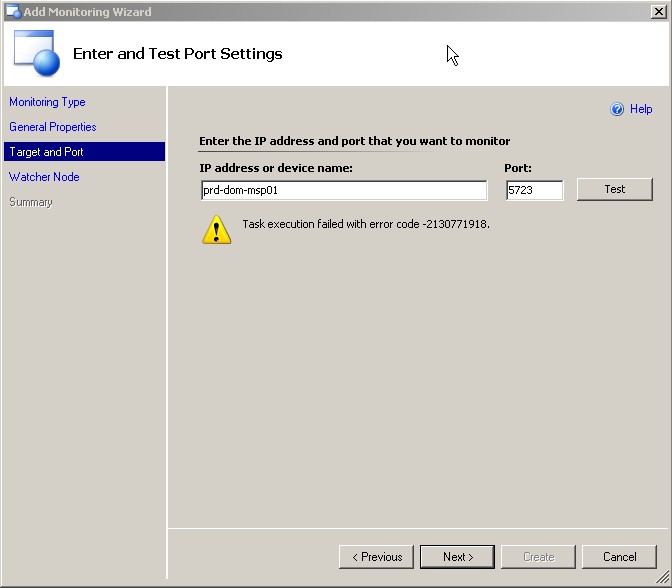
After installing a SCOM hotfix with errors, all TCP and web applications monitors stopped working with always the same error: 2130771918. For example, even a TCP test on the RMS itself failed:
After opening a call to MS, they give us the patch for KB 957511. We are not concerned by this KB but it contains a more recent version of DLL Momnetworkmodules.dll, which does TCP and web applications tests. Once this dll updatedn the problem was gone.

By the way it could have been necessary to register again this dll with:

regsvr32 “c:\program files\system center operations manager 2007\momnetworkmodules.dll”

16 August 2007

SCOM 2007: NLB Management Pack

Monitors Microsoft Network Load Balancing clusters. Detects, sends, alerts, and automatically responds to critical events.

http://www.microsoft.com/downloads/details.aspx?familyid=78d8c93a-bae6-4c5d-90af-b0bf2ce12998&displaylang=en&tm

14 July 2007

SCOM 2007 issue with VmWare ESX VM ?

hello,

I am getting what could be an issue with VmWare ESX Windows VM. After discovering the VM and installing the agent, i got an alert:

----------------------------
The process started at 4:23:08 PM failed to create System.PropertyBagData.
Errors found in output: E:\SCOM2007\Health Service State\Monitoring Host
Temporary Files 2\678\GetOpsMgrDBPercentFreeSpace.vbs(63, 2) Microsoft VBScript
runtime error: Type mismatch: 'CDbl' Command executed:
"C:\WINDOWS\system32\cscript.exe" /nologo "GetOpsMgrDBPercentFreeSpace.vbs"
XXXXXXXX OperationsManager Working Directory: E:\SCOM2007\Health Service
State\Monitoring Host Temporary Files 2\678\ One or more workflows were affected
by this. Workflow name: Microsoft.SystemCenter.OpsMgrDBPercentFreeSpaceMonitor
Instance name: XXXXXXXXXX Instance ID:
{85E3BAF5-9229-2BB9-E50D-F3BE40378AF7} Management group: YYYYYYYY

----------------------------

Any clue on that ? I will digg it any way!

great training video for SCOM 2007

http://weblog.stranger.nl/system_center_operations_manager_2007_training_videos