Showing posts with label WDS. Show all posts

08 February 2010

WDS/MDT: Remove F12

By default, To boot from the network through WDS, you need:

  • set up the bios to boot on the network (F12 in many bios)
  • Once you get a dhcp lease, you have to quickly strike F12 to really boot from the network

This second strike is a default safe option. If the boot order set the network before the hard drive, computers will try to boot from the network all the time. Most of the time, we just boot from the network to install OS, and then always boot from hard drive.

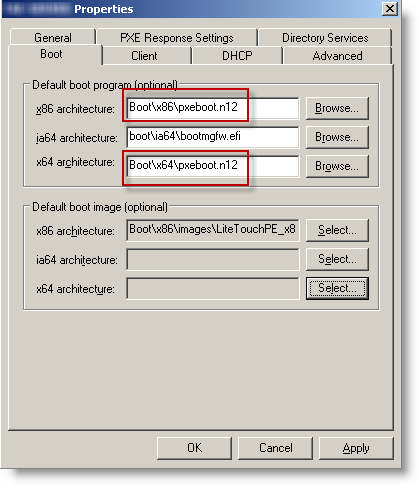
But if you correctly set up your bios, the second F12 is uneeded. You just have to replace pxeboot.com by pxeboot.n12 to remove it:
If you already have an important number of computers deployed, you can centrally configure their bios settings. Dell and HP provides central tools to set their bios remotely (generally through an executable that is deployed:

01 August 2007

Windows Desktop Search On XP with office 2007

If you install Office 2007 AFTER Windows Desktop Search, it won't index Outlook Mail.
You need to install again WDS, it works immediately after !

22 February 2007

Windows Desktop Search 3.01

a new version is out:
-support For UNC
-ADM for GPO
-more stable
-faster

http://www.microsoft.com/downloads/details.aspx?displaylang=en&FamilyID=738fc2de-49b9-4e69-9227-2206277ab7c9