17 February 2010

SCOM 2007 R2: monitor an Amazon EC2 Linux VM

What a strange idea, you may say...But having some VM in the cloud doesn't meant they must be monitored apart. That said, it's quite a challenge:

  • Management Packs from Microsoft don't support Fedora
  • Authentication on VM Amazon are certificate based by default

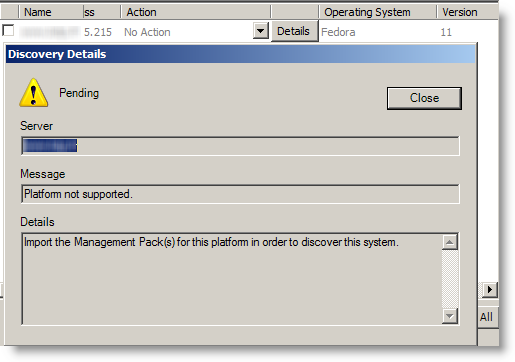
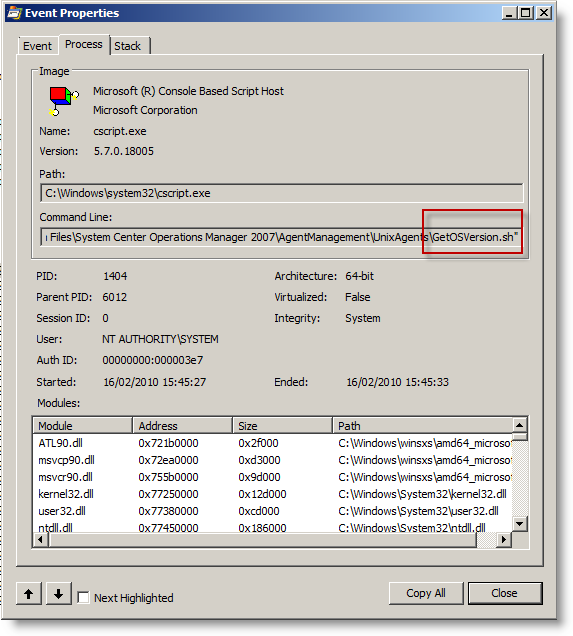
When SCOM detect Fedora, it stop straight forward:To get the Linux version, SCOM execute this shell script here:By the way, this folder also contains RPM package installed next (daemon). Getting on our goal will need works...
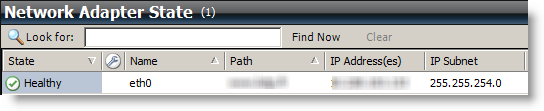
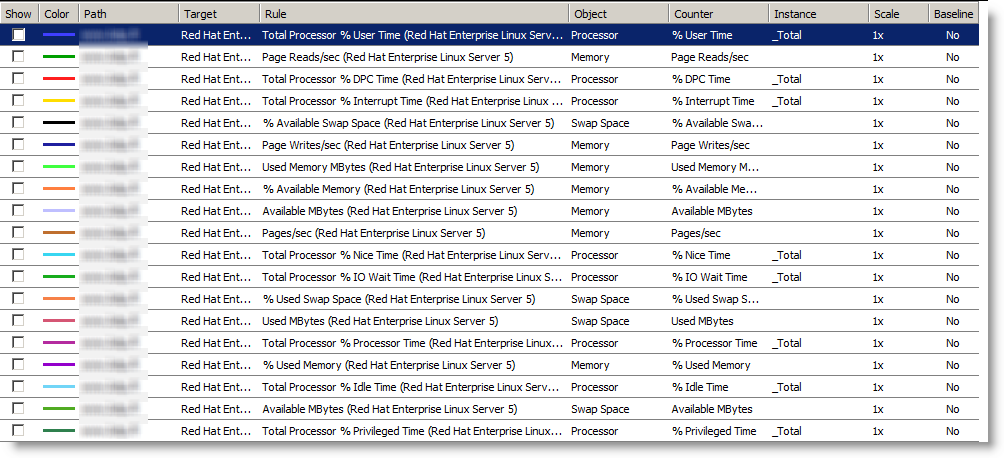
To keep you on, here is one result when it works:Performances SCOM pour une VM Amazon EC2You got it, it's about getting SCOM to believe we have a Red Hat. In fact we have 2 ways:
  • Create our own Management Pack for Fedora.
  • Disguise Fedora as if it was a Red Hat by fooling SCOM.

The first one is the more elegant, but it will take lot of time to get it and then to keep up. So i preferred the second one, as a Fedora is not that far from a Red Hat...

Changes on Linux Amazon EC2


Allow SSH connection without certificate
In /etc/ssh/sshd_config:
PasswordAuthentication yes PermitRootLogin no #Remove also the last line of the file that allow root login without password

Then you need to set a root password:

passwd root

Then reload configuration:

/etc/init.d/sshd reload

Then create a SCOM account:

useradd scom passwd scom
hostname check

By default, the VM got it's internal IP as hostname. SCOM will deploy an RPM to get a daemon running, and will generate a certificate to authenticate.
It's mandatory that the hostname match the name used by SCOM to reach it's agent. The easiest is to change the hostname to a name reachable by SCOM, like you www.mydomain.com:

hostname www.lotp.fr

To keep after reboot, you need to update /etc/sysconfig/network by adding:
HOSTNAME=www.mydomain.com

Dependency

The RPM package from Microsoft depend at least on this 2 libraries:

  • /usr/lib/libssl.so.6
  • /usr/lib/libcrypto.so.6

If your system is more up to date (so.8 …), you will need to make symbolics links (ln -s target realfile):
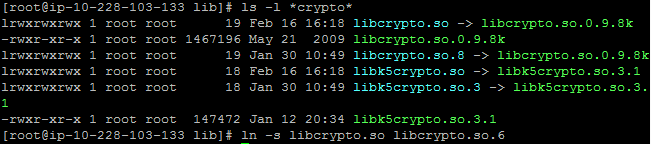

If you don't, you will have these errors messages when installing RPM (first libssl then libcrypto once the first is resolved):

At the end, i have the following symbolics links:
lrwxrwxrwx  1 root root       16 Feb 16 16:19 libssl.so.6 -> libssl.so.0.9.8k lrwxrwxrwx  1 root root       12 Feb 16 16:23 libcrypto.so.6 -> libcrypto.so

I recommend you to copy over the rpm (scx-1.0.4-248.rhel.5.x86.rpm), to check for the good installation result. Else, it will be SCOM that do it during discovery, and error messages are not that explicit.
Moreover, it shows up the name with which the certificate is made:

You can always remove it:

rpm -e scx-1.0.4-248.i386
TCP Ports
SCOM will connect by 2 ways:
  • SSH
  • port 1270 (scom agent)

You will have to set up the Amazon firewall to get these 2 ports reachable. If port 1270 is not reachable, SCOM raise an error about time out, which doesn't help a lot. Traffic to this ports is confirmed by a network trace:

/etc/redhat-release

By default, Fedora create a symbolic link from /etc/fedora-release to redhat-release. You must break it and create a true redhat-relase file with this text inside::

rm /etc/redhat-release echo "Red Hat Enterprise Linux Server release 5" > /etc/redhat-release

Changes on SCOM 2007 R2

Tasks to do:

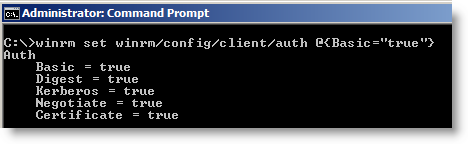
  • Allow WinRM to get basic authentication
  • Import Management Packs Linux/Unix generic and Red Hat
  • Add a Basic Authentication account to log on Linux (not root)
  • Add a Basic Authentication account to log on Linux (Root)
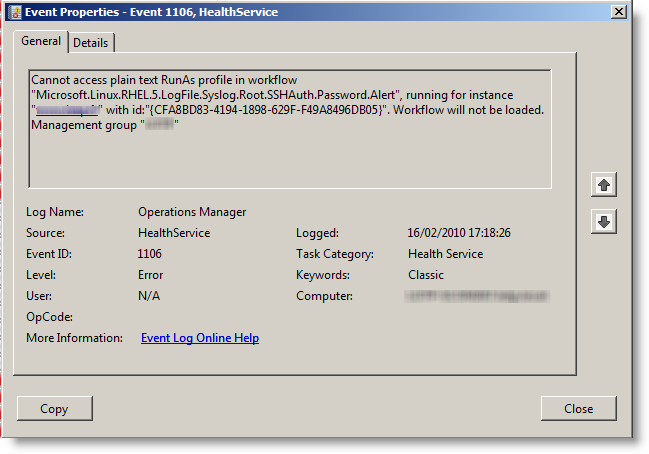
  • Link them to profiles "Unix Action Account" and "Unix Privileged Account"
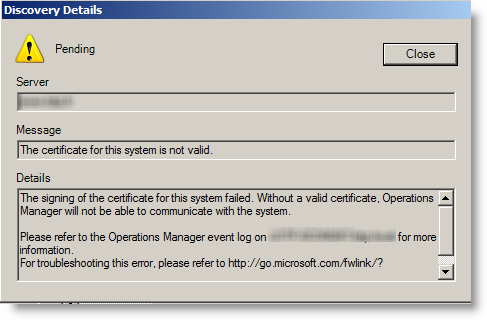
  • Discover the VM and sign certificate

Adding the VM is straight forward if you followed the tasks before. So i will cover the problems i met.

Allow WinRM to do nasic authentication:If you don't have the good hostname, the certificate is refused when it's time to sign it:If you don't add linux account to profiles, workflow don't work:
At the beginning, the VM is not monitored and seen as unknown:

Then it switch to green and known:

Here we go, your VM is now monitored by SCOM 2007 R2.

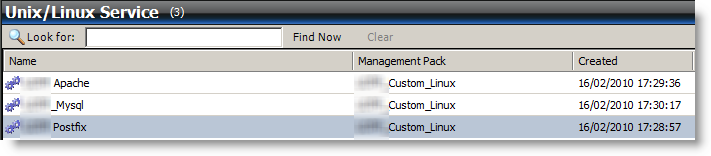
Here are some screenshots once it works:
08 February 2010

Amazon EC2: Very old Fedora image!

I wasn't mistrustful enough at the beginning. One explanation is that i know Linux, but i never used Fedora before, so i didn't know the actual version number....

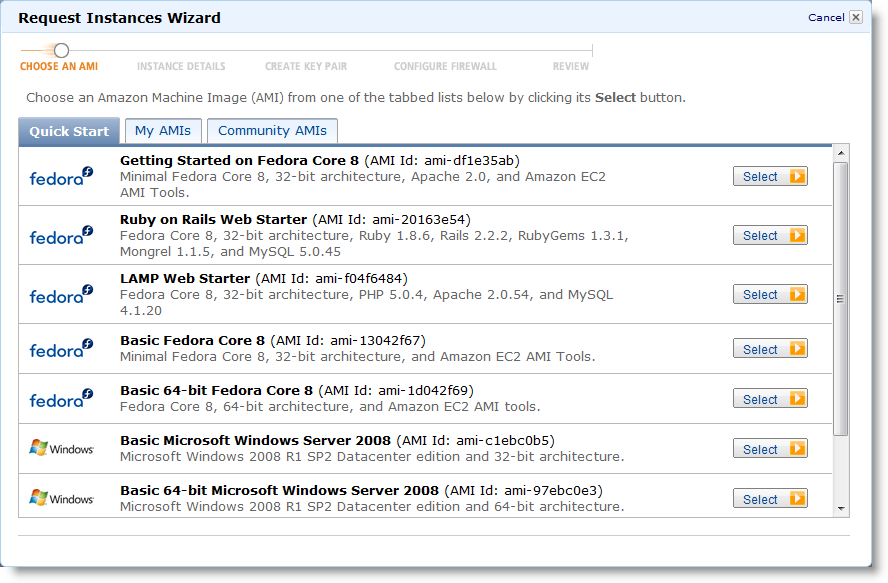
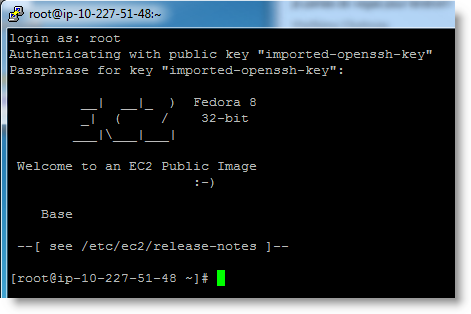
How could i imagine that they provide a 2 years old image ? To remind, here is what they provide:


Version 8 is old enough that you can't upgrade in one shot. You have to upgrade first to version 10 to then upgrade to version 11. I realized that trying to install nagios version 3 without being able to find it...

I found the way to upgrade through Amazon forums:

http://developer.amazonwebservices.com/connect/message.jspa?messageID=141707

In short:

Upgrade to version 10:

yum update -y yum clean all yum update -y yum clean all rpm -Uhv http://mirrors.kernel.org/fedora/releases/10/Fedora/i386/os/Packages/fedora-release-10-1.noarch.rpmhttp://mirrors.kernel.org/fedora/releases/10/Fedora/i386/os/Packages/fedora-release-notes-10.0.0-1.noarch.rpm yum clean all yum update -y yum clean all yum update -y yum clean all

Upgrade to version 11:

rpm -Uhv http://mirrors.kernel.org/fedora/releases/11/Fedora/i386/os/Packages/fedora-release-11-1.noarch.rpmhttp://mirrors.kernel.org/fedora/releases/11/Fedora/i386/os/Packages/fedora-release-notes-11.0.0-2.fc11.noarch.rpm yum clean all yum update -y yum clean all yum update -y yum clean all 

I highly recommend to start by upgrading Fedora version before anything else. As i realized the problem close to the end of my setup, i had packages issues after upgrading, and even some packages i had to remove before upgrading due to dependencies problems!

Mysql

At least the flush privileges wasn't working anymore:

mysql> flush privileges;
ERROR 1146 (42S02): Table 'mysql.servers' doesn't exist
I did a backup before upgrading, and this table wasn't there anyway. I did a Mysql repair & upgrade:
mysqlcheck --all-databases --repair -u root -p mysql_upgrade -u root -p

Yum
Since the upgrade, calling it generate these messages, just before working anyway:
Loaded plugins: dellsysidplugin2, fastestmirror
ERR_OUT: : Bad address
I found the solution in this blog: http://d.hatena.ne.jp/const/20090909
It's due to the smbios-utils package and smbios-utils-python, which helps to get bios informations. Since a virtual machine and i don't have access to bios, i don't care:
yum remove smbios-utils-python

WDS/MDT: Remove F12

By default, To boot from the network through WDS, you need:

  • set up the bios to boot on the network (F12 in many bios)
  • Once you get a dhcp lease, you have to quickly strike F12 to really boot from the network

This second strike is a default safe option. If the boot order set the network before the hard drive, computers will try to boot from the network all the time. Most of the time, we just boot from the network to install OS, and then always boot from hard drive.

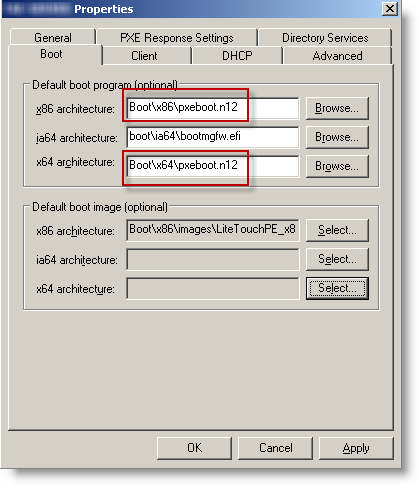
But if you correctly set up your bios, the second F12 is uneeded. You just have to replace pxeboot.com by pxeboot.n12 to remove it:

If you already have an important number of computers deployed, you can centrally configure their bios settings. Dell and HP provides central tools to set their bios remotely (generally through an executable that is deployed:

27 January 2010

From dedicated server to Amazon EC2

I am on the way to migrate from a dedicated server (Dedibox, a french provider) to Amazon EC2. Here are my first feedbacks from Amazon Cloud..

Why i am migrating
My current provider is not allowing true virtualization on theirs servers. Their hardware is strong (Dedibox Pro products), but they prevent Hypervisor through their switches which shutdown port whith more than one mac address. So, without VMware ESXi or Hyper-V, i failback on VMware server on top of a CentOS.
VM are just slow, even with only 5 of them. So i have good hardware which i can't truly use and so write off the cost. It's not hazard, virtualization is the best and common way to use these 8GB of ram and quad core cpu.
At least another provider support ESXi, OVH. But they ask quite much money for that (15€/month to be allowed to have more IP...)
As my goal is to get Virtual machines at the end, Amazon EC2 looked quickly as a good choice. In the worth case, i will pay as much as now, but i will get what i pay for!

Step 1: Amazon calculator
Speaking about money, the first difficulty is to know actually how much it will cost! Well, to be honest, the fist one is to understand which instance is the right for me:
  • On demand: no commitment, pay as you use,
  • Reserved: Pay one shoot fee, and then pay as you use at a low cost,
  • Spot: you don't know when you will get your VM, but it will cost less than On demand, but more than Reserved.
As you guess, 1 VM On demand used (powered on) all time costs much more than a Reserved one used all time.
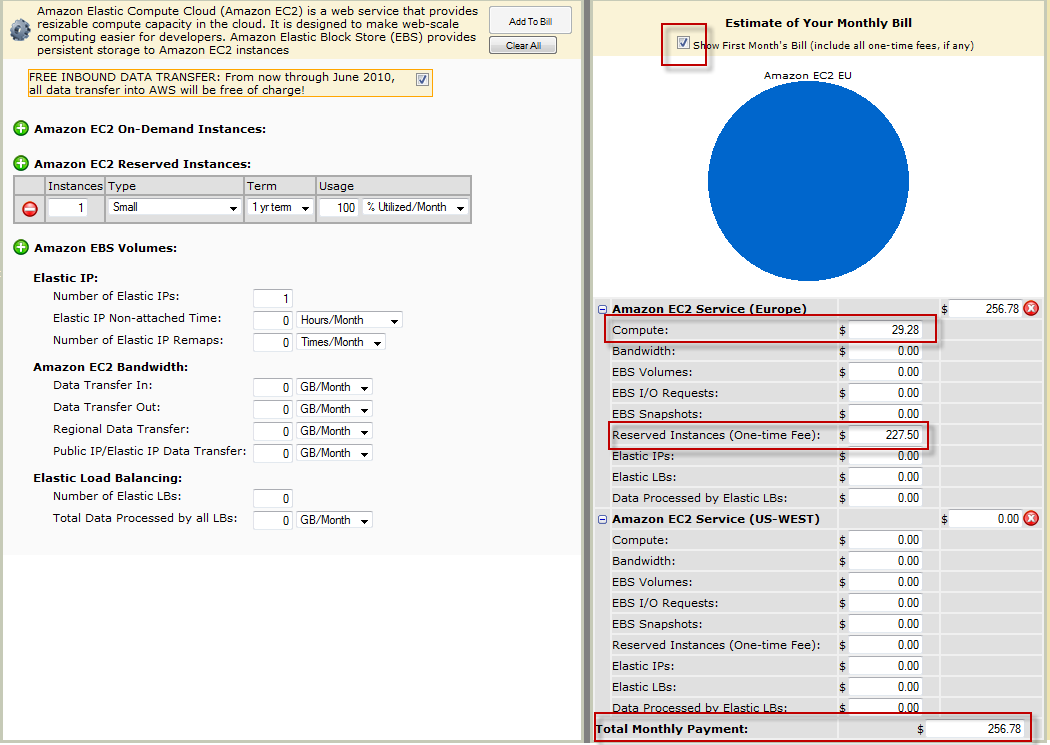
Their calculator have an design issue. By default, it includes the one time fee in the first month free. The quick way is to multiply the numbers you see per 12, and then you get scared for a wrong reason!


So, to get the final cost per month, for one small reserved instance, always on:

(227.50$ + 29.98 * 12) / 12= 48.23$ § month

The average cost of a VM is 34€ per month. For this amount, you have a Linux 32 bit with:
  • CPU: 1 VCPU 1,7Ghz: 1 EC2 Compute Unit (1 virtual core with 1 EC2 Compute Unit)
  • Memory: 1.7GB
  • Storage: 169GB
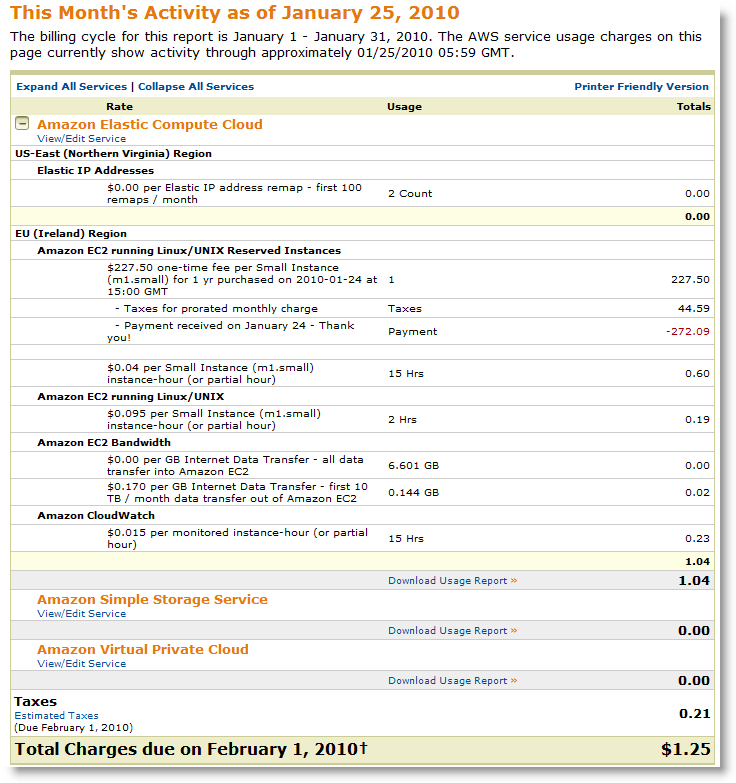
The weird thing is the 44$ of taxes on the bill (see later in this post)...

Step 2: Reserve an instance
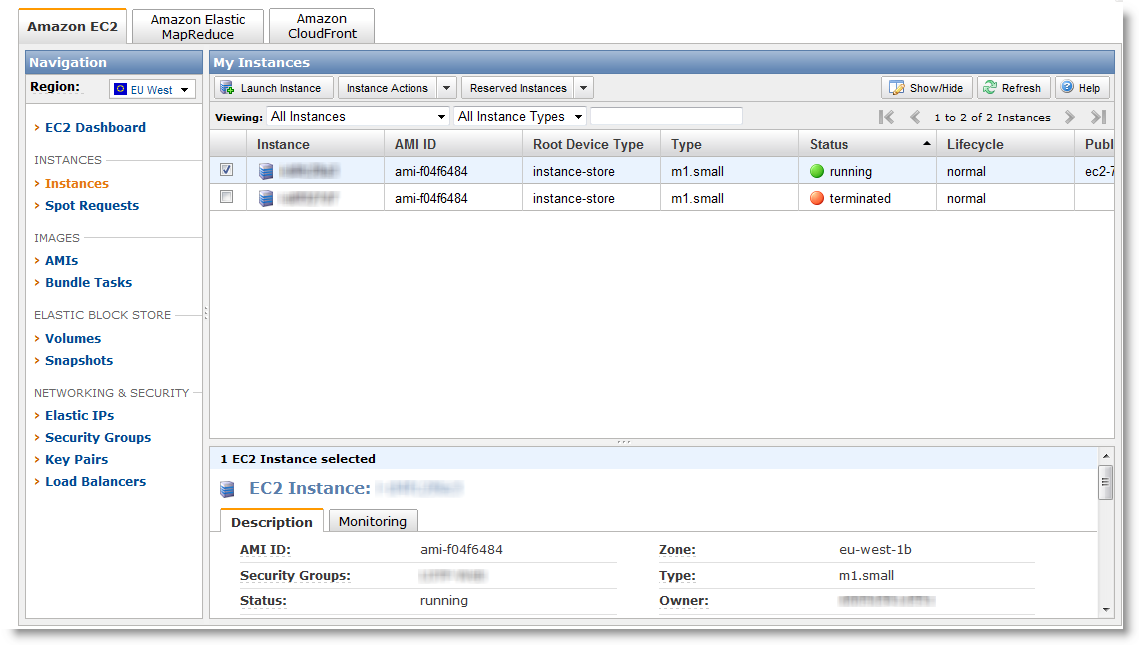
Things are becoming serious! Before, i nevertheless made some benchmark with one On demand VM, to be sure about performance. We choose first the size of the VM (small in my case), where it will be hosted (2 sites in USA, 1 in Europe (Ireland). I chose Ireland, to save the latency over Atlantic. After 5 big clicks, we are pending. After 10 minutes, like on a Formula car race, we are active. Then ? Nothing happens ! No earthquake and no Virtual Machine in the list. Amazon Helps resources are nearly clueless. I finally understood that you have to create a On demand VM, in the same site as your reserved one. As simple as scary, because you don't any word on the interface to comfort you are not going to pay 2 instances. You will have to believe in Amazon and their billing system. Well, it was ok for me, i didn't pay twice!
So far, a reserved instance can only be a linux one. Windows is restricted to On demand, and it's cost is higher than Linux, because the License comes with the VM.
The architecture choice (32/64 bit) depends on the size of the VM.

Step 3: create the VM
Now that i understood and still believe in Amazon, creating a VM is really simple, 5 clicks away and 5 minutes of waiting. You don't install your own OS/ISO, but use a prepared image. They name them AMI (Amazon Machine Image). Amazon have 5 AMI, but the community extend the choice up to 971 AMI.

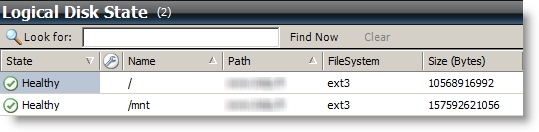
The storage for Linux is 10GB for system and 150GB for data. The VM see 2 partitions:
Filesystem 1K-blocks Used Available Use% Mounted on /dev/sda1 10321208 1383500 8413420 15% / /dev/sda2 153899044 6793004 139288416 5% /mnt none 870472 0 870472 0% /dev/shm

When you create the VM and later on, Amazon provide a firewall outside the VM. You can then manage flow that come in. It's handy, since we save an iptable:

Step 4: Log on the instance
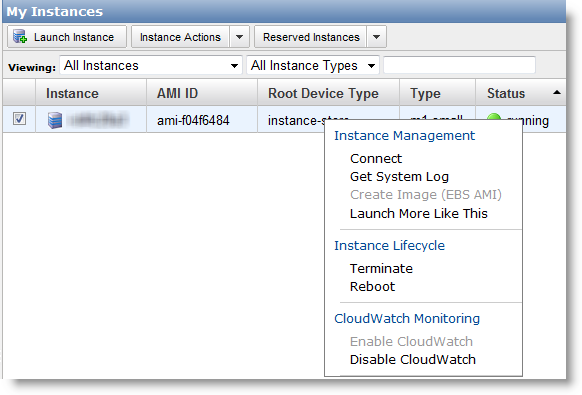
Now that the VM is running, it's time to logon. A right click on the instance shows up this menu:
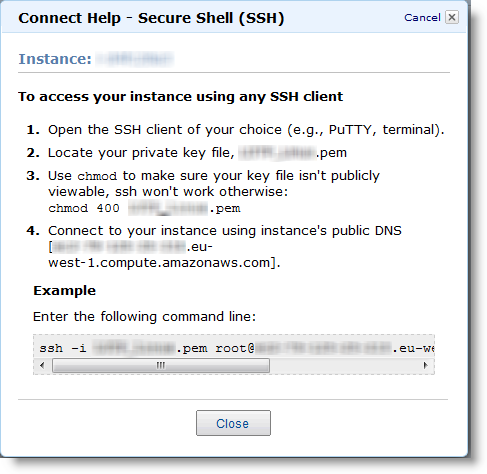
The Connect link gives:

You have understood:
  • No console access (Get System Log shows you the boot log):
  • No root password, but instead a certificate generated when creating the VM)
On Windows, Putty is often used a free ssh client. But Putty can't understand the Amazon certificate. Anyway, Amazon explains how to workaround it here:
http://docs.amazonwebservices.com/AmazonEC2/gsg/2007-01-19/putty.html

In short, you have to use PuttyGen, from the author of Putty, to convert the Certificate in a one Putty understand. After, it works great:

Step 5: Performances
This is the critical part when it comes to Virtual Machines. Good news, i am very happy with the performance:
  • Network: easily get 20Mb/s
  • Storage: 121MB/s in writing (dd if=/dev/zero of=dd.dd bs=1M)
Why does Amazon provide that performance ? Because they bill the network as you use it (0.170$ per GB of traffic). Unlike others hosting that bill all included, Amazon won't loose money if a big user comes in. On my previous provider, i could use 100Mb/s non stop without paying more. So they share a lot connections to outside (peering), and so network is slow.

I prefer to pay a bit more when i use more, but have this quality. We can follow nearly in real time our usage and so next bill:

26 January 2010

LOTP Consulting

I am looking for short term missions, like:

  • Fireman on down production
  • Audits (pen tests, infrastructure 's health…)
  • Performances issues
  • Projects
  • Pilot/POC
  • Remote admin

Need a new look on unsolved problem?

My Microsoft/Network/Security knowledge enable me to integrate all layer of your infrastructure in the brainstorming, and so to suggest the best solution in your environment.
Unlike mono product/techno experts, i use my global view to spot impacts on all your layers and correlate events or settings together.
I am use you have pebble in the shoe that i would enjoy to take off! Remote or on site, from one hour to 2 months, we will find a way in your context.

Going further

I am reachable here: mathieu.chateau@lotp.fr

Linkedin : http://www.linkedin.com/in/mathieuchateau

14 January 2010

IIS 7 on Server Core

Manage IIS7 from Vista

You need to:

  • Download the management console from iis.net (owned by Microsoft): http://www.iis.net/expand/IISManager
  • Install the IIS management service: start /w ocsetup IIS-ManagementService
  • Switch this registry key to 1: EnableRemoteManagement (HKEY_LOCAL_MACHINE\SOFTWARE\Microsoft\WebManagement\Server) on the server to allow remote management for IIS
  • Start the wmsvc service : net start wmsvc

Import a certificate

The MMC certificate console can't add certificate to remote store (pfx). You will need to do it locally, using certutil command line:
certutil -addstore MY mycertificate.pfx

The MY argument is to specify the computer store

01 January 2010

Book: Confessions of a public speaker

I just read this great book from Scott Berkun. I bought it on the O'Reilly website, since they provide PDF without protection, which is perfect for my evernote: http://oreilly.com/catalog/9780596802004

It was really enjoying and giving some amazing advices.

20 December 2009

Windows Server 2008 R2 on my mac book air!

This post is following a previous one I have a Mac..How bad is it doctor?
I installed Windows 7 RC, which was working great. Nevertheless, i needed to run a Windows Server 2008 R2 with hyper-V. As this one can't run inside a VM, i decided to install it on my MacBook Air.
The steps are easy but there is one critical event to not miss...Here we go:
Copy the BootCamp folder from MacOSX DVD to a usb key, this will be mandatory later!

Start under MacOSX. Through the bootcamp application, make hard drive space to Windows.
Boot on the Windows Server 2008 R2 DVD, and make a normal install.
As the first logon, you must immediately install the bootcamp drivers through the usb key (the external dvd drive is not yet working from windows). Fire up the msi directly. If you don't and restart or logoff, you won't be able to logon again, because the apple keyboard is not installed and so ctrl+alt+del won't work!
I had to connect an external usb keyboard to do it !

Then you just have to make Windows Server 2008 R2 looks like Windows 7 through powershell:
import-module servermanager
Add-WindowsFeature Desktop-Experience
Add-WindowsFeature Wireless-Networking
Add-WindowsFeature Net-Framework
Add-WindowsFeature Telnet-Client
Set-Service -name Themes -startuptype Automatic
shutdown /r /t 15 /c "reboot to make themes service working"

Then you just have to activate the Windows 7 theme.

Installing Hyper-V prevent the laptop from hibernate:
Sleep and hibernate power features are not available when you enable Hyper-V technology on a Windows Server 2008-based portable computer

So i added a boot option to load Windows without Hyper-V:
bcdedit /copy {current} /d "Microsoft Windows Server 2008 - without hypervisor"
bcdedit /set {GUID of the previous command} hypervisorlaunchtype off

27 September 2009

SharePoint 2007 slowness

I recently had to solve 2 SharePoint 2007 slowness:

  • The next call following application pool recycle : 2 minutes to get the page
  • When searching for people in AD: a least 30 seconds

2 minutes to get the page

IIS tries to contact crl.microsoft.com through http, but can't. This is to verify assembly's signatures in the GAC. Causes and solutions are explained on this blog:

http://www.muhimbi.com/blog/2009/04/new-approach-to-solve-sharepoints.html

I chose the following one:

Here we go, dropping load time to 20 seconds, which is "normal" since it has to compile again. But you can still go further by:

  • Modify when the application pool is recycled
  • Use SPWakeUp, to "warm up" the SharePoint engine by calling every site once

Search in AD : at least 30 seconds

When: you try to authorize a user, a group or just assign a task to someone. This takes around 30 seconds instead of one. I am targeting the time needed between the click and having the name underligned.

Causes: In my case, tracing the network activity of the server, i realized it was failing to contact domain controllers of another forest when i checked a user name. This try is due to the add of another forest in peoplepicker's property, through stsadm. By default, SharePoint only checks users in it's own domain. To extend the search to others domains or forest, you need to add them through this command:
stsadm -o setproperty -url http://SharePointSite:85 -pn peoplepicker-searchadforests –pv “domain1.com”,,;”domain2.com”,,

If you have trust between the SharePoint's domain and the targeted one, you don't have to provide credentials.

Here is a more detailled post: http://www.gk.id.au/2009/04/people-picker-sharepoint-and-forest.html

Solution: Allows SharePoint to connect to the domain controllers of these targets. The port to open is ldap (389) both in TCP and UDP.

That's it, it nows takes again around one second and we can now search people in the other forest!

17 August 2009

BgInfo: error with success without success

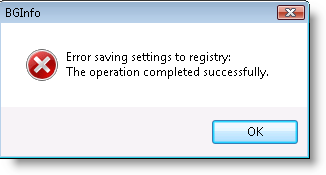
I hadn't used bginfo from Sysinternals for a long time. As usual, i added the company logo as background, but here comes the surprise when saving:

bginfo
(Error saving settings to registry: The operation completed sucessfully)

So we have an error saving to the reigstry, but the operation is a success...Amazing ? Obiously, disappointed few seconds later, no bgi file...

Context:

  • Windows Vista SP1 32 bit
  • Last bginfo (4.15)
  • With and without privilege escalation (Why do we suspect immediately UAC?)

What can we do when a Sysinternal tool fails ? Use another Sysinternal tool for diagnostic!
Process monitor
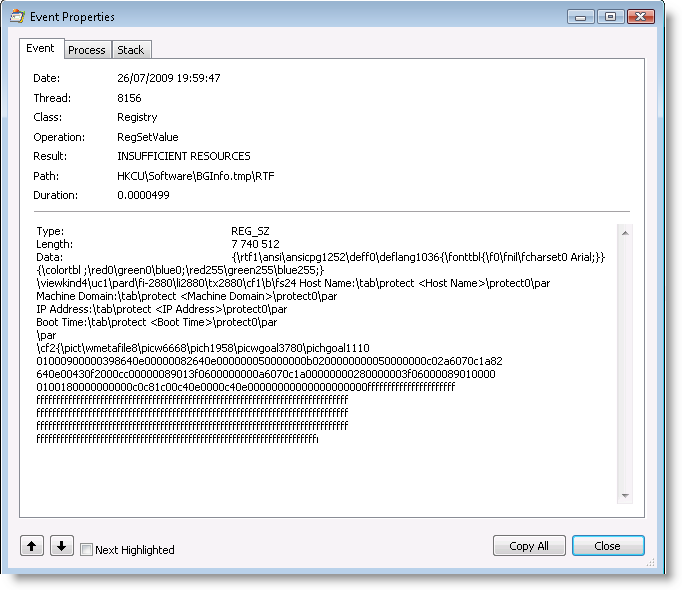
shows up an error for "insufficient resources":

bginfo_processmonitor

Process explorer shows that the system is missing some resources (but still 742MB of available memory immediately)
procexp

I tried on my workstation with 8GB of ram, same..Windows XP ? same!

Finally, i reduced the picture before importing, and it worked great.

I sent a quick mail to Mark Russinovich…Feedback one hour later:

Thanks for the bug report, Mathieu. It looks like Bginfo was trying to write 7MB to the registry.

28 July 2009

All you need to know on NLB

NLB (Network Load Balacing) from Microsoft have the advantage to come directly through the OS. As its name state, it allows to spread the load among many nodes, that are members of the farm (cluster). It's quick & easy to set up, or it looks like so, but there are many things to check if you want it to be more than appearing to work...

Network impact

NLB can works in two modes:

  • Unicast
  • Multicast (with or without IGMP)

Which one to pick ? It Depends! Things that make choose one:

  • Which application will be used through the farm ? Does it support both mode ? For example, ISA 2006 only supported unicast until Service Pack 1 (a hotfix was available but not so famous)
  • How many network cards do the nodes have ? Unicast will require 2 interfaces minimum to respect best practice.
  • Do the nodes need to communicate between them ?
  • Is the multicast filtering activated on the switches ? It prevent flooding the network
  • Some switches (Cisco as example) do not stand at all to see the same mac address on the network from each node. You then have to convert your switch to hub, sending all packets to all farm members.

Monitoring & availability

It is true that if one node goes out of the network, the others will take its load over. But it's a full failure. If you have 2 nodes, and just stop your business application on one node, NLB will still send clients to it, and so you just lost half of your customers. NMB is layer 3 (IP), and so isn't aware at all of anything upper this layer. Even if the TCP port is not listened anymore. That's the pitfall of NLB. Microsoft included sentinel in the resource kit. It allowed to test a web page on each node and push it out of the farm if it's not working. ISA 2006 manage directly NLB, and can push a node out if ISA goes mad. So it's your duty to fill the gap. If it's a web site running through IIS, you can change a key in the metabase,LoadBalancerCapabilities to replace the 503 per a TCP reset. So the client will reconnect and send again its request, on another node.

To fill this gap, you can use your monitoring solution or a script looping on each node. The goal is to test each node from the application point of view, and push it out in case of error. Appliance load balancer (Alteon...) do the same, the industrial way. What you must take care:

  • You must check nodes as often as possible, but without overloading them. The best is to include this monitoring need in the application, by including a special web page that will test for us the applications compponents (database access...) and then back the result through a code.
  • Your monitoring becomes "active" (acting directly on the production by its own)

The Microsoft monitoring, SCOM, is interesting since you can act on trigger (eventlog, files...)

NLB versus MSCS ?

an MSCS cluster is meant to be active/passive. At anytime, resources are owned by only one node, which must be able to handle the full load. The good things is it can manage data, which are shared accross nodes and it monitors resources (state of windows services..). There again, it doesn't cover all case, especially when the application is there, but not answering anymore requests (database access lost...).

Other solution ?

  • I already set up Safekit from Evidian on Windows. Not bad, but applications checks are still for you (how could it be the other way ?)
  • Load balancer appliances (F5;Alteon...). As great as expensive...
  • Keep with only one node ?

KB/Articles:

IIS Responses to Load-Balanced Application Pool Behaviors

NLB Operations Affect All Network Adapters on the Server

Unicast NLB nodes cannot communicate over an NLB-enabled network adaptor in Windows Server 2003

The “NLB troubleshooting overview for Windows Server 2003″ article is available

How to deploy a Secure Socket Tunneling Protocol (SSTP)-based VPN server that uses Network Load Balancing (NLB) in Windows Server 2008

An update enables multicast operations for ISA Server integrated NLB

Windows Server 2008 Hyper-V virtual machines generate a Stop error when NLB is configured or when the NLB cluster does not converge as expected

Terminal Services Client Cannot Connect to NLB Cluster TCP/IP Address

The NLB WMI Provider Generates a Lot of Error Entries in the Wbemcore.log File

How NLB Hosts Converge When Connected to a Layer 2 Switch

Windows Server 2003-based NLB nodes in an NLB cluster cannot communicate with each other over an NLB network adapter

Servers in a Network Load Balancing (NLB) failover cluster cannot be used as print servers in Windows Server 2008

Network Load Balancing (NLB) clients cannot connect to the Windows Server 2008 NLB cluster by using the virtual IP address when NLB is running in multicast mode

The virtual IP address of a Windows Server 2008 NLB cluster is bound to the NetBIOS host name of a particular server or of multiple servers

15 July 2009

I have a Mac..How bad is it doctor?

Those who read my blog for some time may get surprised, but i just bought a Mac! A MacBook Air, the one with an SSD of 128GB. My XPS M1210 is now quite old (2006) and didn't loose its weight since! Notebook with high performance (alienware..) are around 3 kilos minimum, so i stopped the rush to performance, as i can know connect to my hosted server to get the missing performances..

The good:
  • It's really faster than my previous one. The CPU is lower, but the system bus upper than 1Ghz helps a lot, as having DDR3.
  • The WiFi is really great, bandwidth climb immediately to the top of my ADSL access, with both MacOSX & Windows 7. The chip is a Broadcom 802.11n.
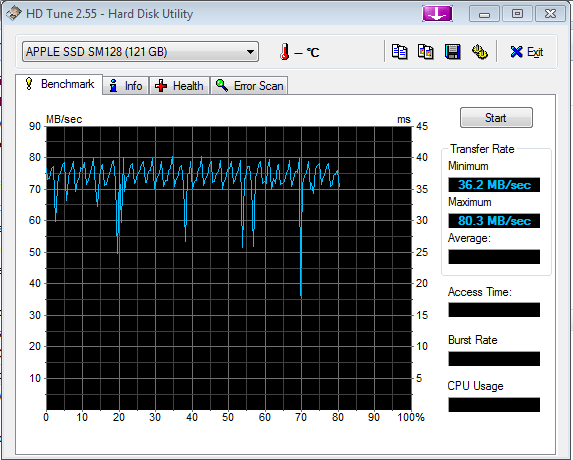
  • The SSD is also great, close to my SuperTalent.
  • Windows 7 64 bit RC get ready in 28 seconds.
  • The keyboard is lighted
The not so good:
  • I installed Windows 7 64 bit through Boot Camp. Windows is working great, but the Apple's drivers a lot less (see later in this post).
  • MacOSX keeps the time in GMT (in bios). When Windows 7 boot, i then have 2 hours late. If Boot Camp get installed, it adds a time service to hide this difference (AppleTimesrv.exe)
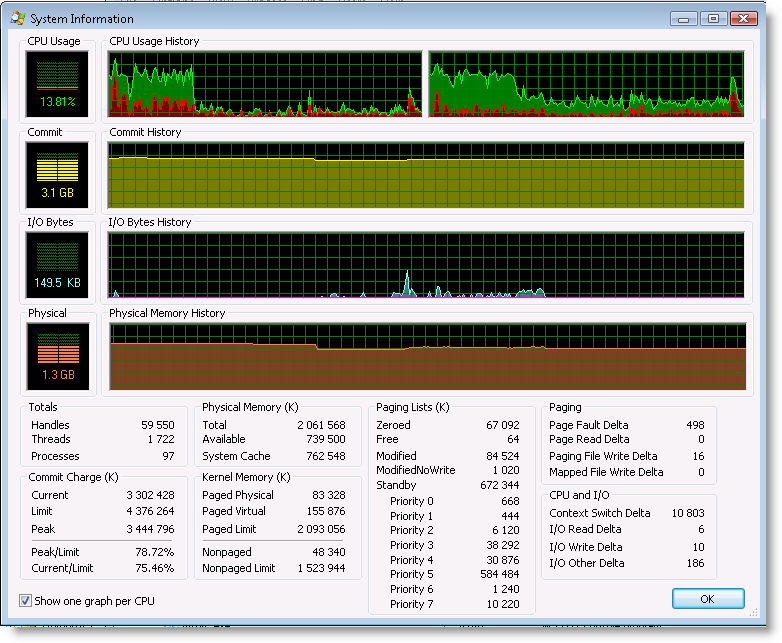
  • The graphic card memory is shared, so we have 1764MB of memory for Windows.
  • No TPM, so no smart encryption with Windows 7.
SSD Performances:

Boot Camp drivers & Windows 7 64 bit:
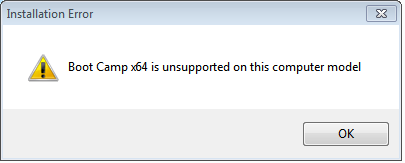
By default, the setup stop immediately:
Now we have 2 ways:
  • Change the MSI to skip this check, but Windows 7 alerts on issue with it...Safe to install?
  • Apply directly drivers to device without Apple setup.
I chose the second way, that worked, but no Boot Camp control panel as i didn't install the Apple layer. That generates some issues:
  • To switch to MacOSX, i have to hold "Alt" when powering on.
  • No right click, neither multitouch, even with drivers.
  • No access to shortcuts over F1-12.
Not having the right click by now is not funny at all. MacBook Air only have one USB port, so connecting an external mouse full time is not an option. (The Ethernet module need it too..)

So i choose to finally install Boot Camp anyway. The DVD i got with the laptop already contains Boot Camp version 2.1. As it won't let you going the smart way, we have to lie it a bit:
  • Switch regional settings (Formats) to English (United States). Their MSI doesn't stand French at least, generating an error 2229.
  • Launch the MSI directly from the DVD:\Boot Camp\Drivers\Apple\BootCamp64.msi
  • If it's not enough, you will have to change the registry key HKLM\SOFTWARE\Microsoft\Windows NT\CurrentVersion from 6.1 to 6.0 to simulate Vista. To be put back after.
If you are having issue, here are some infos to help out:

Path to the Boot Camp control panel: C:\windows\system32\AppleControlPanel.exe

Drivers/services/shims launched by Apple at boot time:

HKLM\SOFTWARE\Microsoft\Windows\CurrentVersion\Run:
Apple_KbdMgr Boot Camp Manager c:\program files\boot camp\kbdmgr.exe
IRW IR Receiver Application c:\windows\system32\irw.exe
RtHDVCpl HD Audio Control Panel Realtek Semiconductor c:\program files\realtek\audio\hda\ravcpl64.exe

HKLM\System\CurrentControlSet\Services:
AppleOSSMgr c:\windows\system32\appleossmgr.exe
AppleTimeSrv c:\windows\system32\appletimesrv.exe
aapltctp Apple Trackpad Enabler c:\windows\system32\drivers\aapltctp.sys
aapltp Apple Trackpad Driver c:\windows\system32\drivers\aapltp.sys
applebt Apple Bluetooth c:\windows\system32\drivers\applebt.sys
applemtm Apple Multitouch Mouse Driver c:\windows\system32\drivers\applemtm.sys
applemtp Apple Multitouch Trackpad Driver c:\windows\system32\drivers\applemtp.sys
AppleODD Apple Optical Disc Drive c:\windows\system32\drivers\appleodd.sys
AppleUSBEthernet Apple USB Ethernet Adapter Driver c:\windows\system32\drivers\appleusbethernet.sys
DevUpper Apple iSight Driver c:\windows\system32\drivers\isightft.sys
IRRemoteFlt IR Receiver Driver c:\windows\system32\drivers\irfilter.sys
KeyAgent Apple KeyAgent Driver c:\windows\system32\drivers\keyagent.sys
KeyMagic Apple Keyboard Driver c:\windows\system32\drivers\keymagic.sys

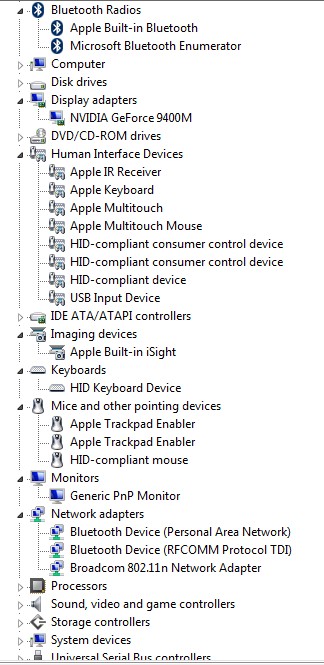
Devices as they must appears:


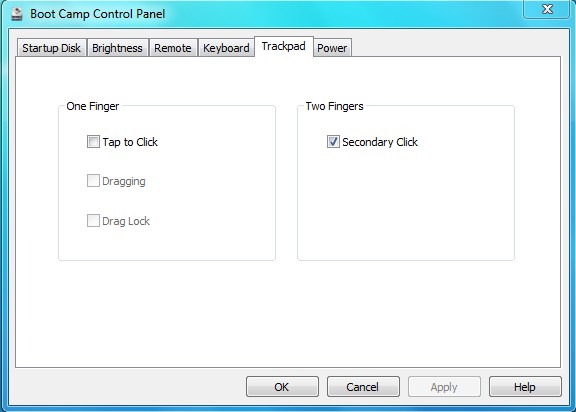
Boot Camp must have a Trackpad tab among others:

Some tips:

  • Right click: 2 fingers on the touchpad + trackpad button
  • Page up/down: 2 fingers that go up or down on the touchpad (multitouch)
  • Delete: Fn + backspace
  • Choose OS at boot time: hold Alt key while powering on.
Hope it helps!

21 June 2009

Going 64bit:: leader or last one ?

64 bit platform has been reserved for 'big system" during a long time, when a lot of memory or cpu math were needed. With the time being, it's now so common that any pretty current desktop /laptop can do 64 bit. Nevertheless, 64 bit keep used only when it's mandatory, as it's still not so obvious on what it brings. Microsoft put some pressure by supporting Exchange 2007 on 64 bit. As it's stalling, they add more pressure by supporting Windows 2008 R2 only on 64 bit.

Why do we put the brakes on 64 bit ?
  • A lot of software editors don't offer a 64 bit version of teir products. So it will works, but through Wow64 to emulate 32 bit anyway.
  • Drivers must be signed by Microsoft. Why ? Around 2 blue screen (BSOD) on 3 are due to bug in drivers. To be signed, a driver must pass some tests, to be considered as stable. You can even make these tests yourself by launching verifier. This is as simple as doing Start / Execute / verifier. Even if you are an admin and not a developper, you will want to use the developper scenario. Many checks are available:
You shouldn't activate these tests on all drivers, as you may not be able to boot again. Except if you are really confident on your drivers quality (or already signed)!

Some editors provide a 64bit version, but all processes are still 32 bit. It's just that their 32 bit version still works in 64 bit.

Apple, with Snow Leopard, finally make the big bang choice: they only provide a 64 bit version. iMacs and others won't have this new version, and editors will have to povide correct 64 bit versions.

Should you be a leader on 64 bit deployment ? I don't think so, except if you truly need it, as with all new technology. But, deploying 64 bit in 2009 doesn't make you a leader anymore! Ok, you still have to manage changes on your teams, a lot on the dev team. As i always recommend, think big but start small. Use new project to learn on 64 bit impacts.

07 June 2009

Cygwin1.dll and the mysterious version problem

As i started computing on Linux/FreeBSD, I still my little habits to parse logs (awk/sed/cat/sort/uniq…).
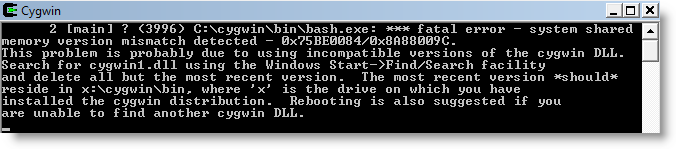
Recently, cygwin, a Unix shell port on Windows, stopped working:

cygwin

So there is a trouble with cygwin1.dll. Indeed, i am also using another tool, John the ripper, that has been ported to Windows through cygwin.
But the DLL for JTR is much older than the one included in my cygwin. Starting in the reverse order gives same result, except it's JTR that crash for same reason.

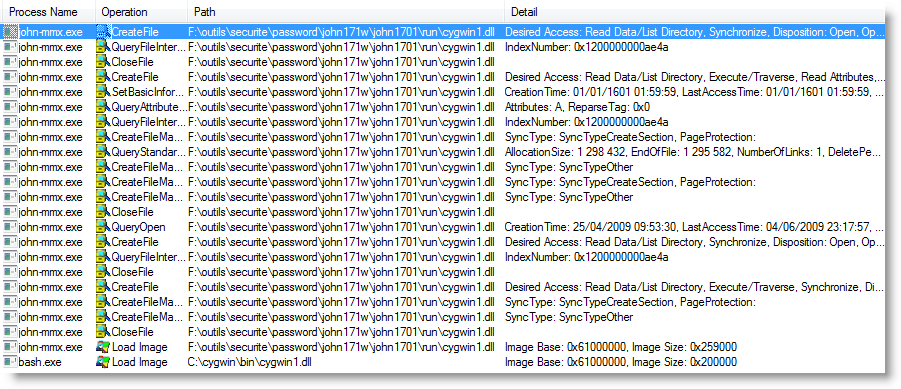
Procmon from Sysinternals confirm that each program load its own cygwin1.dll. But cygwin doesn't read the DLL file, instead it just do a "Load image". JTR does it, but after reading the DLL file:

procmon

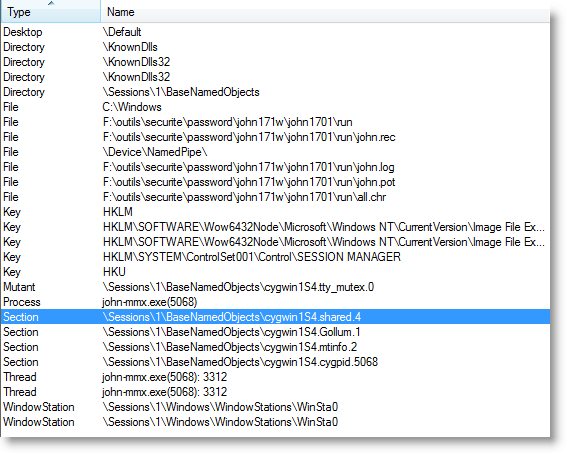
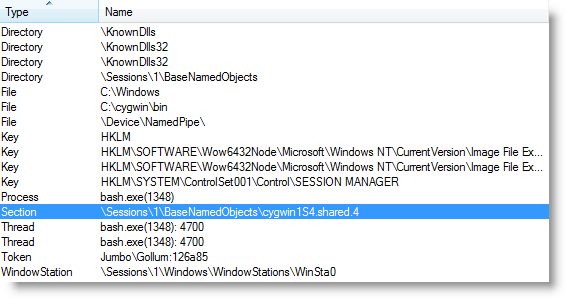
Process Explorer helps me to point out the root cause. Cygwin1.dll uses a section type handle that have the same name, anyway which version of the DLL is used.

Handles for JTR:
cygwin1_processexplorer_jtr

Handles for cygwin itself (bash.exe)cygwin1_processexplorer_cygwin

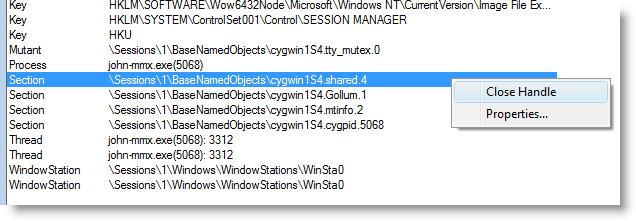
I could confirm the diagnostic using a feature of Process Explorer: close an handle inside a process:

cygwin1_processexplorer_jtr_close

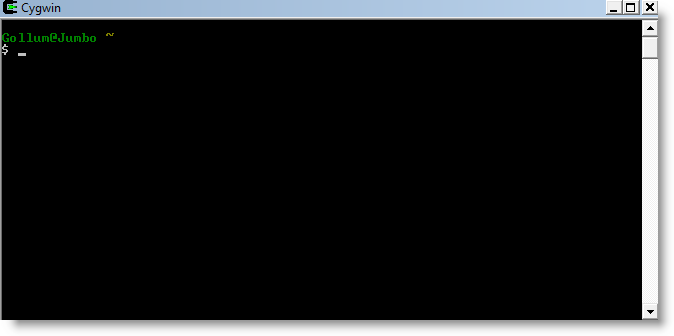
The cygwin shell is now working while JTR is also running. The thing is that i don't what could be the consequences in JTR:

cygwin

06 June 2009

The case of the driver leaking handles - Marvell Yukon Service

I noticed that one of my process, rundll32, was leaking handles thanks to Process Explorer, a sysinternal tool. Rundll32 is a Windows hosting process, so it's the process hosted inside that is leaking. Hopefully Process explorer says who is behind by just overlaping the cursor:
So the hosted service is Marvell Yukon Service (yksvc), used by my network card. To find what sort of handle is leaking, i added the lower pane inside Process explorer by pressing crtl +L. Scrolling down, i found a lot of mutant, always on the same object, \BaseNameObjects\NetCfgWriteLock. All new handle are highlighted in green, so i found out that it keeps opening a new handle every second or so:
A right click allows to get its property:
As Mark always recommend, i checked my driver version, which is a bit old:
A newer version is available on the Marvell support page, so i decided to give it a try.
Before doing the driver update, i used perfmon on my system to check the handle behavior before and after the upgrade. It confirmed that the bug is now resolved:
Thanks to mark tools & tutorial, this problem is gone :)

21 May 2009

my migration to Google Apps: the good, the bad and the ugly...

Bored ? Migrate to Google Apps to shake your brain!

As input, i had:

  • One Gmail account(2Gb of mails ; agenda ; reader ; contacts)
  • One pop account
  • my domain (lotp.fr) with my main email forwarded to the pop account

As output… Everything in Google Apps using my domain :)

Activation of Google Apps for your own domain is really simple and fast (< 15mn)…Up to now, rock & roll !
Of course, it would be great if it could just import the Gmail account into Google Apps… But if it was the case, i wouldn't be blogging about it !

The good…

  • Works immediately
  • No Credit card asked
  • We can change the url to a more friendly one, likewebmail.mydomain.com
  • Google Labs is still there, with all same addons as Gmail
  • Having Google mail servers as frontend for incoming mail reduce a lot spam (compared to the forwarding solution i had before)

The bad…

  • Google doesn't give any way to migrate Gmail content to Google Apps. It's a shame! Even GoogleEmailUploader given by Google exclude Gmail account as source…Yes, it's not a bug, it's a feature! I used the way explained here : synchro of the 2 accounts through imap protocol with an open source tool named imapsync. The thing is that you need the best Internet connection you can and a Linux in hand. Using my hosted server, it did 2Gb in 3 hours. Globally, it's all goods, maybe except one or two attached files that became corrupted!! Don't be afraid, the source mailbox isn't changed neither emptied, so you can just keep it at hand for some months in case..
  • For your contacts and calendar, you will have to do a 2 way steps, synching the old account with a local mail client, and then the client with the new account.

The ugly…

  • No Google Reader! That's really ugly when you have 300 rss sources... Don't cry, there is a workaround! You have to create a new google Reader, using your google apps account (same login/pass). Then export and import your rss feeds. You still don't have the link to Google Reader from Google Apps, and you still have to logon again on google Reader.
  • Looks like people had more space on Google Apps than Gmail before. I have the same amount as my Gmail account...In fact, i even have 1Mb more on Gmail than my Google Apps account ;) . Except if you switch to the Premier edition with 25Gb
Up to now, i am very satisfied with the service, especially for a free service! I would be ready to for more space in Google Documents (same space as a Gmail account) and Google Reader integrated.

UPDATE: I finally decided to use Google Email Uploader on my 64 bit desktop. It does not find any mailbox to upload (outlook, thunderbird, same problem). My luck is that a braveful guy spent the time to understand why and make a working version for 64 bit, working for me: http://blog.insanegenius.com/2009/01/google-email-uploader-on-vista-x64.html

16 May 2009

how to reset domain admin password on a Windows Server 2008

I did not use my tests Virtual Machines for some times just after installing them....I forgot the domain admin password :'(
I found a hack for Vista, that i reused for my Windows Server 2008 Domain controller !
I just pushed it a litlle further by only using the official Windows Server 2008 DVD from Microsoft instead of backtrack :)

For people in hurry, here are the steps:

  • Boot onto DVD of Windows Server 2008
  • Choose “Repair your computer”
  • Launch cmd
  • Go to c:\windows\system32
  • Rename Utilman.exe to Utilman.exe.bak
  • Copy cmd.exe to Utilman.exe
  • Reboot on Windows
  • Do the keyboard shortcut Windows + U when on the logon screen
  • net user administrator Newpass123 inside the cmd
  • log on with the domain admin account and this new pass
  • change the password to remember it if needed
  • Reboot on the DVD to put back the original Utilman.exe
http://www.youtube.com/watch?v=Ar-VoO9ogHc


11 May 2009

Management Pack Dell: Regional settings bug

[Update: Dell will only deliver a 4.0 with this bug corrected. No intermediate release. We signed an NDA to get a hand on the 4.0 beta, but i left the company before having it. The 4.0 should be released by the end of july.]

I have an open issue with the Dell Management Pack and our regional settings. I found out the bug, the resolution, but now Dell ask me to wait for the MP V4.0 because i am the only one to report this bug.

I guess that we are not the only one to have this bug, and it's about people not going through opening a case at Dell. I will expose the issue here, hoping others will realize they are affected too. My goal is to have Dell releasing a corrected version before 4.0 that will be out in months.

The Bug is for DellStorageDiscovery.vbs:

Source: Health Service Modules
Event number: 21405

The process started at 09:29:38 failed to create System.Discovery.Data, no errors detected in the output. The process exited with 0 Command executed: "C:\WINDOWS\system32\cscript.exe" /nologo "DellStorageDiscovery.vbs" {XXXXXX-XXXX-XXXX-XXXX-XXXXXXXX} {XXXXXXX-XXXX-XXXX-XXXX-XXXXXXXXXXX} agent.mydomain.com Working Directory: C:\Program Files\System Center Operations Manager 2007\Health Service State\Monitoring Host Temporary Files 1\1821\ One or more workflows were affected by this. Workflow name: Dell.Connections.DellStorage.Discovery Instance name: agent.mydomain.com Instance ID: {XXXXXX-XXXX-XXXX-XXXX-XXXXXXXX} Management group: FIRSTMG

------
The badly function is (in red the problem):
Function CheckVBScriptEngine()
Dim bIsCompatV, var
Const VBSCRIPT_MIN_VERSION = 5.6
var = ScriptEngineMajorVersion & “.” & ScriptEngineMinorVersion
If (CInt(var)) < biscompatv =" False" biscompatv =" True"> 0 Then
CheckVBScriptEngine = Err.Number
Else
CheckVBScriptEngine = bIsCompatV
End If
End Function

The corrected function is:
Function CheckVBScriptEngine()
Dim bIsCompatV, var, sep, WshShell
Set WshShell = WScript.CreateObject(”WScript.Shell”)
sep = WshShell.RegRead(”HKCU\Control Panel\International\sDecimal”)
Const VBSCRIPT_MIN_VERSION = 5.6
var = ScriptEngineMajorVersion & sep & ScriptEngineMinorVersion
If (CInt(var)) < biscompatv =" False" biscompatv =" True"> 0 Then
CheckVBScriptEngine = Err.Number
Else
CheckVBScriptEngine = bIsCompatV
End If
End Function

PS: I also have a similar bug with the Microsoft ISA 2006 Management Pack. Microsoft acknowleged the bug and is going to deliver a new release.

05 May 2009

SCOM/OPSMGR: Web Application: Untrusted CA

Context:

  • You created a web application which use https (SSL)
  • The checkbox “monitor SSL health” is checked
  • When you log on the watcher node and call the same pages, you don't have any security alert through internet explorer
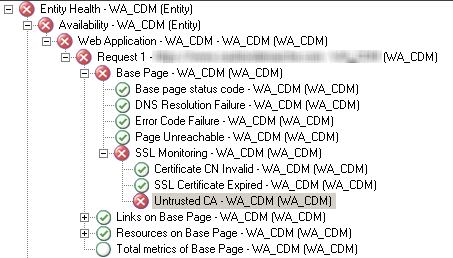
  • You do have the following error:

Cause:
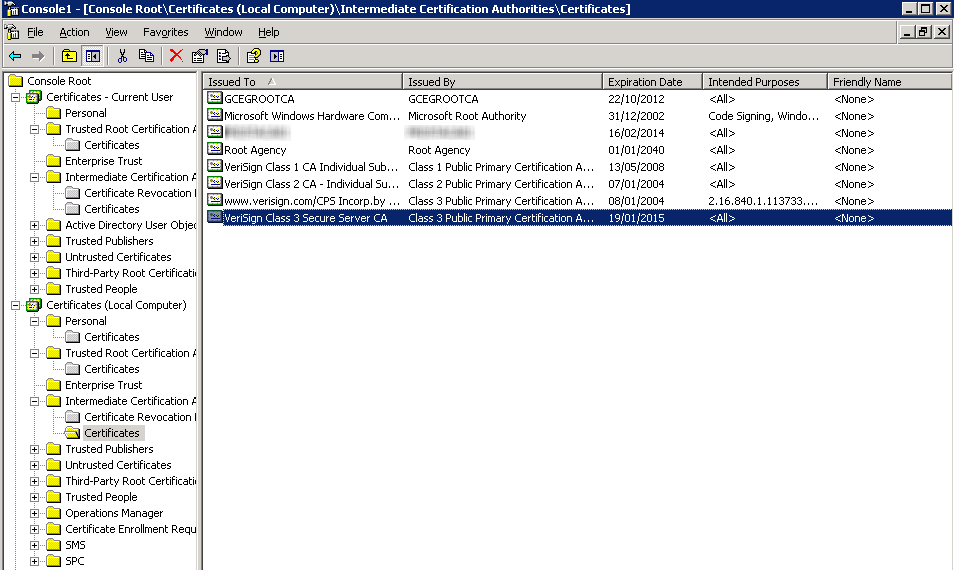
You are missing a certificate on the chaine. Your user account has the full chaine, but not the computer account. In my case, i had to add a Verisign (Class 3) certificate for the local computer account:
…And alerts are gone! We could just uncheck the health monitoring of certificate, but it's always better to get notified when it's expired :)

OpsMgr/Scom: error 2130771918 on all TCP & web applications

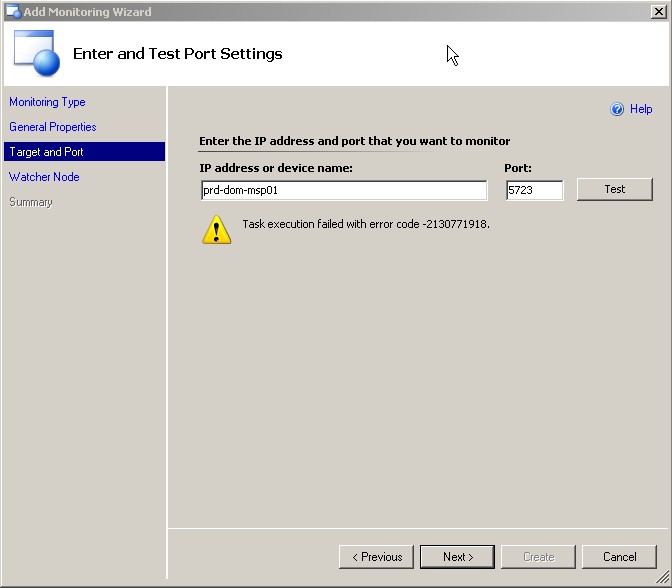
After installing a SCOM hotfix with errors, all TCP and web applications monitors stopped working with always the same error: 2130771918. For example, even a TCP test on the RMS itself failed:
After opening a call to MS, they give us the patch for KB 957511. We are not concerned by this KB but it contains a more recent version of DLL Momnetworkmodules.dll, which does TCP and web applications tests. Once this dll updatedn the problem was gone.

By the way it could have been necessary to register again this dll with:

regsvr32 “c:\program files\system center operations manager 2007\momnetworkmodules.dll”